NVGate V18: Release note
OROS continues to invest in practical innovation that helps users move faster from measurement to decision. With NVGate V18, the focus is clear: remove workflow bottlenecks, extend analysis reach in demanding transient conditions, simplify setup, and reward loyal customers with immediate new value. Customers under contract automatically benefit from each release.

NVGate V18 is now available. This new update of the OROS signal analysis platform delivers smarter workflow flexibility, broader synchronous order analysis coverage, easier sensor configuration, and upgrade benefits designed to make every NVGate investment go further.
This release note describes the content of the version, with operating details.
To download and install NVGate V18, check this page.
Compatibility: NVGate V18 is compatible with the following OROS instruments: O4 - OR35 TW - OR36 TW - OR38 TW. Depending on the hardware options and version, some instrument features may or may not be available.
>> 4 practical improvements to speed up measurement, analysis, and upgrade value
 Dual NVGate instances |
 SOA dynamic speed ratio extension |
 Pre-loaded sensor library |
 Loyalty reward upgrades |
|---|---|---|---|
| Run live measurement and offline post-analysis in parallel on the same PC, with no second license required. |
Follow variable-speed rotating events much further into low speed while keeping synchronous order results continuous and phase-accurate. |
Skip manual transducer entry and get correct measurements faster with ready-to-use sensor definitions. | Upgrade to V18 and unlock extra value with D-Rec and TDA for eligible customers. |
 NVGate ADVISOR: Expert by your side all the time !

Have you ever hesitated in selecting analysis parameters ?
Have you ever spent hours trying to figure out why results are not as expected ?
Have you ever ended up with useless measurement data due to slight negligence in settings ?
As a beginner, have you ever wished to have an expert to check your settings, fix mistakes and explain why ?
As an expert, have you ever wished to be notified when you made the rookie mistake?
With NVGate ADVISOR, the metrology watchdog developed with OROS know-how accumulated over 40 years, you will always be accompanied by a noise and vibration expert.
You are doing impact testing? Check out this step-by-step guide!
You are doing rotating machine analysis? Check out this video!
NVGate ADVISOR brings to the user:
Notification
When one or more issues are detected, the user will be notified immediately by the “Advisor” icon in the “Home” tab and “Analysis” tab,


or by the icon at the lower right corner of NVGate.
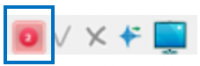

The number shown in the icon is the number of new (unread) Advices generated after the last time the user checked the Advisor window.
There are three levels of notification, which are color coded:
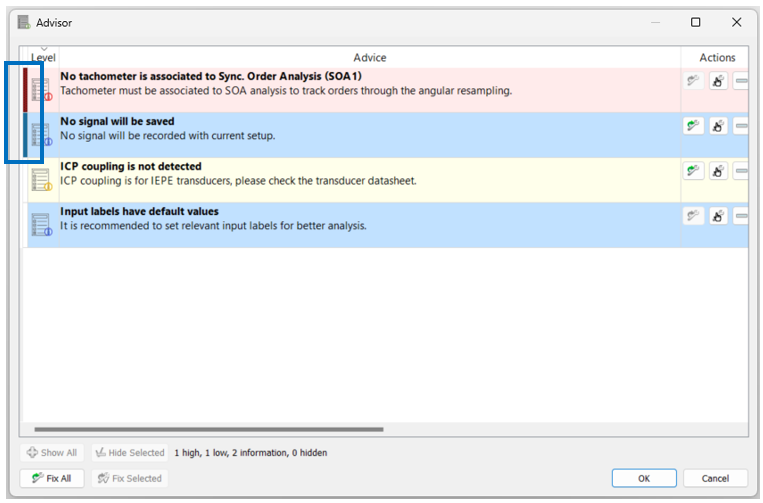
 Error (red): It is certain that a mistake occurs, and the measurement will not be done correctly.
 Warning (yellow): It is well likely that a mistake occurs based on our know-how.
 Suggestion (blue): It might not be a mistake, but probably a negligence.
Explanation and suggestion
Click on the Advisor icon, and the Advisor window will be opened. The bar in the beginning means that this Advice is new and unread. In each Advice, the explanation of the detected issue is given, and corresponding solution or suggestion is proposed to assist the user to set up properly and obtain correct measurements. Based on the information, the user can decide to fix the issue or ignore it.

Actions
 Auto-fix: When this icon is activated, the solution proposed in the Advice can be applied automatically. With auto-fix, it becomes easy to set up NVGate properly in minimal time. NVGate configuration remains available for your own settings.
 Manual-fix: Clicking this icon will open the configuration window containing the parameter which is suggested to be modified. User can solve the issue manually by following the suggestion given in the Advice.
 Ignore: User can hide the Advice which is not concerned.
 Fix-all: For all the Advices in the list that can be fixed automatically, the solutions will be applied.
 Show-all: All the ignored Advices will be shown again.
Advisor works in both online and post analysis modes, helping user to properly set up NVGate efficiently. The majority of current Advices are for the application of impact testing and rotating machine analysis, and more Advices covering a wider range of applications will be available in the future NVGate versions.
 Modbus TCP/IP client add-on compatibility

The new Modbus TCP/IP client add-on is available now. It reads entries from Modbus server and injects the data to NVGate in real-time.
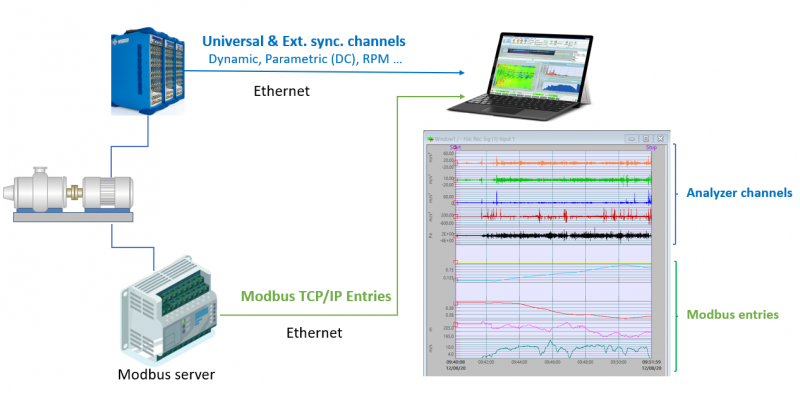

The add-on reads from Modbus server the entries which are synchronized with dynamic / parametric / Ext. sync. channels acquired from OR3X or O4 analyzer, and reinjects the entries to NVGate in real-time using simulated DC channels. These values are then managed as DC data in NVGate. The entries can be saved as properties of projects / measurements automatically. They can also be used to trigger measurements (recorder, SOA, waterfall …).
Requirements: the PC running the Modbus TCP/IP client add-on should host at least 2 Ethernet connectors. One is dedicated for OR3X analyzer, and the other is for establishing connection to the Modbus server. The Modbus server is identified with an IP address and a port number.
 Tachometer setup becomes hassle-free

When pulses from tachometers are acquired by Ext. Sync. inputs, user needs to know the delivered outputs in order to correctly set up parameters, for example, threshold, coupling, range peak and so on. In addition, properly setting up max speed, which is linked to the shaft speed, is crucial for a successful analysis such as order tracking. However, sometimes it could be difficult for the users to understand all these settings.
The most common rotating speed sensors are now available in the transducer database. User simply selects the sensor from the transducer list, and the tachometer settings are ready.
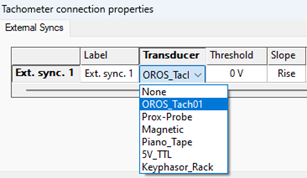

The transducers in the list can be customized, and new transducers can be added by editing the file “Tachometers.tdb”, which can be found in the installation directory of NVGate.
New default settings
The default settings for waterfall depth have been updated in order to facilitate your measurements and analysis.
- When only 2D results (Profiles) are collected in waterfall, by default the waterfall depth is 100,000.
- When 3D results are collected in waterfall, by default the waterfall depth is 1000.
Be aware that if you load an exiting project, the settings will not be affected. You can also easily change these settings.
New release of solutions
Same as NVGate, our dedicated solutions keep progressing as well, bringing new features and improvements.
New Balancing 2023
The new version includes the following new features:
- Rotor positions can be disabled in the correction prognosis.
- Correction based on user-defined weights is now available.
- Allowed maximum weight can be set for each position now.
- Full compatibility with NVGate 2023.
New ORBIGate V7.2
The new version includes the following new features:
- To comply with the standard ISO 20816, the indicator S [pk-pk] for the maximum shaft vibration is now available.
- Tachometer setup becomes hassle-free: User can simply select the sensor from the transducer list, and the tachometer settings are ready.
- Signals are saved by default now, avoiding empty-hand situation due to negligence.
- Full compatibility with NVGate 2023.
Please read the dedicated release notes for more info.
Bug fixing
In NVG2023.1:
- 14729: CANBus J1939 compatibility
- 15258: CANBus: Add CAN 2.0B